Slide 19 of 41
Notes:
Using the SEDRIS Browser (continued�)
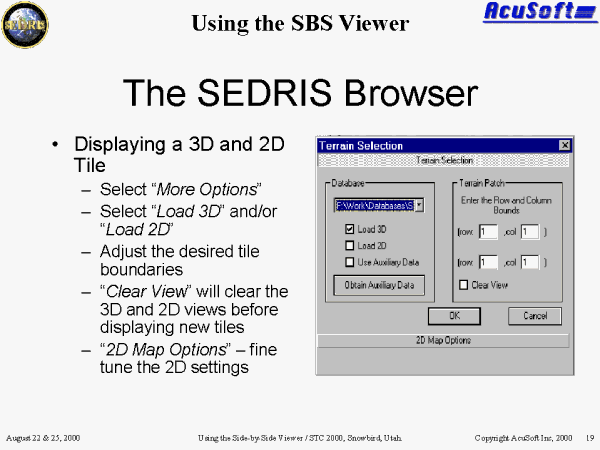
Selecting �More Options� will bring you to the Terrain Selection Dialog Box.
This dialog box is used to fine tune the area of the database that you wish to load. Select the tile index bounds to match the area of the database you are interested in viewing.
- �Load 3D� will cause the 3D tiles in the specified bounds to be loaded.
- �Load2D� will cause the 2D tiles in the specified bounds to be loaded.
- �Use Auxiliary Data� see SBS Auxiliary Data tutorial section (slide 30).
- �Obtain Auxiliary Data� see SBS Auxiliary Data tutorial section (slide 30).
- �2D Map Options� will allow you to customize 2D settings. Such settings include the type of feature data that should be loaded.